
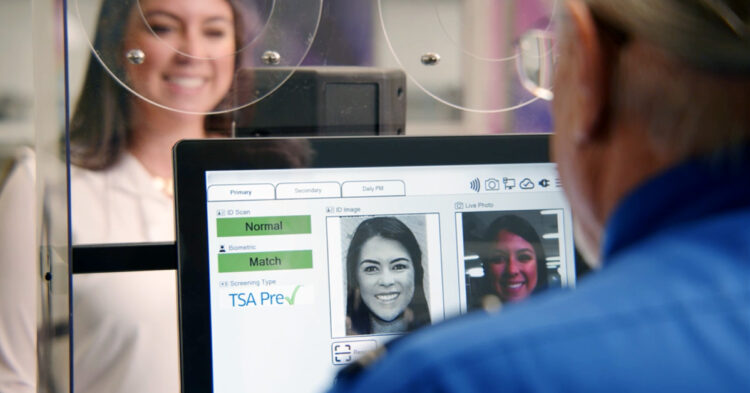
TSA is implementing a lot of changes so that our experience going through security checks isn’t so complicated, and now they’ve launched a new Touchless ID system for people who have PreCheck. What does this mean? Well, with facial recognition (yes, they scan your face) you don’t need to show your ID at some airports in the country. And it’s not just a few, Chicago, Dallas, New York, Los Angeles, Las Vegas, and San Francisco have already joined this change because speed is what matters most to these users. And now it will be even faster, you’ll look at a camera, and in less than a blink the system will recognize your face and off you go! The best part? You don’t even have to stop to talk to anyone.
What is Touchless ID
This new system is called TSA PreCheck Touchless ID, and it’s already working in the main cities of the country. If you already have PreCheck, you just have to activate the option from your airline’s website or app (in the travel documents section), and from there, in compatible airports, all you need is a face scan. They take a photo, compare it to the one they already have in the database (from your passport or real ID), and if everything matches, you pass “the test”.
How it works exactly
It’s very easy, as long as you’re already signed up for TSA PreCheck. If you have your Known Traveler Number (KTN), you just have to enter it on the airline’s website or app when managing your trip. In the “travel documentation” section you add the data they ask for, and that’s it.
Then, when you arrive at the airport (if it’s one that has this system), you stand in front of a camera and they scan your face. The system compares that image in real time with the one they have stored in the government’s database. No need to take out your ID or passport, or show it to anyone. Everything is registered in the system and they let you go on your way.
Where is it available
The system is already working in 15 airports in the United States:
- Chicago O’Hare
- Dallas-Fort Worth
- Denver
- Detroit
- Las Vegas (Harry Reid)
- Atlanta (Hartsfield-Jackson)
- JFK and LaGuardia (New York)
- Los Angeles (LAX)
- Newark
- Portland (Oregon)
- Washington Reagan
- Salt Lake City
- San Francisco
- Seattle-Tacoma
Be careful, just because the airport has the system doesn’t mean all airlines use it. For example, in San Francisco it’s only active if you fly with United Airlines. So it’s a good idea to check first which airline you’re flying with and if they have the system implemented.
Clear advantages
Everything is faster: you don’t have to stop to show documents, or dig through your backpack (it’s always lost, right?), and no one has to review it. Everything is automatic and done in seconds.
- More comfortable: fewer steps, fewer interruptions. You go through security almost without noticing and you don’t have to stop in front of any agent.
- Safer (they say) because facial recognition technology reduces human errors.
- More and more places: already 15 airports and probably more soon.
Most likely, soon it will be all airports using this system (or something very similar) for travelers to pass through. You won’t have to show anything on paper, just registering and taking a good photo will be enough to fly. That said, many users are scared about what happens with their photos afterward, and the TSA and the Government haven’t explained very well where that data is stored or for how long, oh, that we don’t like so much!
But if it’s about saving time at airports, that we do like!